5 Hidden Features of the Pebble Mouse 2 M350S You Must Know About
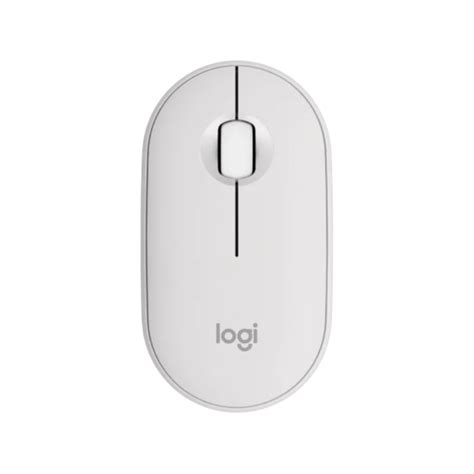
When Logitech released the original Pebble M350, it quickly became a staple for students, digital nomads, and minimalist enthusiasts. Its low-profile design and silent clicks addressed a specific niche: the need for a portable, stylish, yet functional pointing device that didn't scream "office equipment." However, years of hardware evolution have led us to the Pebble Mouse 2 M350S. On the surface, it retains that iconic, smooth river-stone aesthetic that made its predecessor famous, but underneath the recycled plastic shell lies a suite of sophisticated features that many users overlook.
The Pebble Mouse 2 M350S is more than just a cosmetic refresh. It represents a shift in how Logitech views entry-level peripherals—incorporating elements of their high-end MX Master series into a device that costs a fraction of the price. While most owners will simply pair it via Bluetooth and start clicking, there is a wealth of productivity-enhancing technology hidden within the Logi Options+ software and the hardware itself. In this deep dive, we explore the five most critical hidden features that transform this simple mouse into a multi-tasking powerhouse.
Detailed Product Analysis: The Evolution of a Classic
To understand the "hidden" value of the M350S, one must first look at the foundation. The Pebble Mouse 2 is built with sustainability in mind, featuring at least 50% certified post-consumer recycled plastic. But the real evolution is in the connectivity and the sensor. Unlike the original, which relied heavily on a dedicated USB receiver (though it had Bluetooth), the M350S is built for a Bluetooth-first world, optimized for Low Energy (BLE) stability. This serves the modern buyer who is likely using a thin-and-light laptop like a MacBook Air or an XPS 13, where USB-A ports are a relic of the past.
The sensor has also seen a significant bump. While the original was capped at 1000 DPI, the Pebble Mouse 2 can reach up to 4000 DPI. This high-precision optical tracking allows the mouse to work on more surfaces than before—though it still struggles on clear glass, it is remarkably consistent on denim, wood, and even slightly glossy laminate desks. This versatility is what makes it a premier travel mouse. You aren't always working on a mousepad; sometimes your workspace is a cramped tray table on a flight or a crowded cafe table.
The buttons are another area of refinement. Logitech utilizes "Silent Touch" technology which removes 90% of the click noise. This isn't just about being polite in a library; it’s about the tactile feedback. The click feels "pillowy" yet responsive, providing enough resistance to prevent accidental clicks while remaining nearly inaudible. This careful balance of tactile and acoustic engineering is a hallmark of Logitech’s modern design philosophy.
Feature 1: Multi-Device Easy-Switch Technology
Perhaps the most significant hidden feature—and the one that justifies the "2" in its name—is the inclusion of Easy-Switch technology. In the past, this was a feature reserved for the expensive Logitech "Master" or "Anywhere" series. On the bottom of the Pebble Mouse 2, you will find a small button with three LED indicators. This allows the mouse to be paired with three different devices simultaneously.
Imagine the real-world workflow: you are typing a paper on your MacBook, but you have your iPad set up next to it for research. Instead of needing two mice or manually unpairing and re-pairing, you simply tap the button on the bottom of the mouse. The M350S instantly switches its Bluetooth signal to the second device. For professionals who juggle a work laptop, a personal tablet, and perhaps a home theater PC, this feature is a game-changer. It effectively eliminates the desk clutter of multiple peripherals and makes a "single-mouse setup" feasible for power users who are usually on the move.
Feature 2: App-Specific Button Customization
Most users assume the middle scroll wheel is just for scrolling or the occasional middle-click. However, when paired with the Logi Options+ software (available for Windows and macOS), that middle button becomes a "magic" key. The "hidden" aspect here is the ability to assign different functions to the middle button depending on which application you are currently using.
For example, you can program the middle click to be "Mute/Unmute" when you are in a Zoom or Microsoft Teams call. Once you switch over to Google Chrome, that same button click can be set to "Back" or "Refresh." If you are a designer using Adobe Photoshop, you can set the middle button to "Undo." This level of granular control is rarely found in such a compact, budget-friendly device. Buyers who care about efficiency often overlook this because they don't bother installing the supplementary software, but doing so unlocks a degree of automation that significantly reduces hand movement and speeds up common tasks.
Looking for the best Electronics deals on Amazon?
View Offers →Feature 3: The Logi Bolt Security Standard
While the Pebble Mouse 2 is marketed as a Bluetooth mouse, it is secretly compatible with the Logi Bolt receiver. Logi Bolt is Logitech’s next-generation wireless protocol designed for high-performance, secure connections in congested wireless environments. Most offices are saturated with Bluetooth signals, which can lead to "mouse lag" or dropped connections. Logi Bolt uses a proprietary encryption method based on Bluetooth Low Energy but with added security layers that meet Federal Information Processing Standards (FIPS).
The "hidden" catch? The receiver isn't included in the box to keep costs down and reduce electronic waste. However, if you already own a Logitech Signature M650 or a modern Logitech keyboard that came with a Bolt receiver, you can pair the Pebble Mouse 2 to that existing dongle. This provides a more robust connection than standard Bluetooth and ensures that your mouse movements and clicks are encrypted—a vital consideration for corporate environments or users handling sensitive data.
Feature 4: Smart Wheel Speed Scaling
The scroll wheel on the M350S looks like a standard rubberized wheel, but it features a software-controlled speed scaling system. In the Logi Options+ settings, you can enable a "smooth scrolling" algorithm that mimics the kinetic scrolling found on smartphones. When you flick the wheel quickly, the software interprets this as a desire to move rapidly through a long document or web page, giving you a boost in scroll speed.
This is particularly useful for users dealing with large Excel spreadsheets or long social media feeds. While it doesn't have the physical "MagSpeed" electromagnetic wheel found on the MX Master 3S, the Pebble Mouse 2 uses sophisticated software polling to bridges the gap. It makes the scrolling experience feel much more modern and fluid compared to the "notched" feel of traditional budget mice. It’s a subtle touch that buyers only notice once they’ve used it for a few hours, yet it significantly improves the tactile relationship with digital content.
Feature 5: Advanced Power Management and Custom Battery Alerts
The Pebble Mouse 2 claims an impressive 24-month battery life on a single AA battery. While that is impressive in itself, the hidden feature lies in how the mouse manages its "sleep" states and how you can monitor it. The M350S uses a highly efficient sleep cycle; it enters a "shallow sleep" after just a few seconds of inactivity and a "deep sleep" after minutes. Unlike cheaper mice that require a click to wake up (leading to a delay), the Pebble Mouse 2 wakes up via its optical sensor instantly upon movement.
Furthermore, through the Logi Options+ dashboard, you can see the exact percentage of your battery rather than just a vague "Green/Red" light. You can also set up custom notifications. Instead of the mouse dying in the middle of an important presentation, you can program your computer to give you a pop-up alert when the battery hits 10% or 5%. This predictability is invaluable for travelers who might not have a spare AA battery readily available in their laptop bag.
Pebble Mouse 2 M350S vs. The Competition
To help you understand where the Pebble Mouse 2 sits in the current electronics landscape, we have compared it to other popular portable mice based on the features that matter most to mobile workers.
| Feature | Pebble Mouse 2 M350S | Original Pebble M350 | Microsoft Bluetooth Mouse |
|---|---|---|---|
| Max DPI | 4000 (Adjustable) | 1000 (Fixed) | 1000 (Fixed) |
| Multi-Device | Yes (3 Devices) | No (1 BT, 1 USB) | No (1 Device) |
| Custom Buttons | Yes (via software) | No | Limited |
| Recycled Plastic | 50% or more | Varies | Minimal |
| Connection Type | Bluetooth / Logi Bolt | Bluetooth / USB Receiver | Bluetooth Only |
Pros and Cons of the Pebble Mouse 2 M350S
- Pros:
- Extreme Portability: The slim, flat profile fits easily into laptop sleeves and even pockets.
- Silent Operation: Ideal for shared workspaces, flights, and quiet study halls.
- Multi-Device Pairing: The ability to switch between three devices is a high-end feature at a budget price.
- Customizable Software: Logi Options+ turns a simple mouse into an app-specific productivity tool.
- Long Battery Life: Two years of usage on a single battery reduces maintenance and environmental impact.
- Cons:
- Ergonomics: The low-profile design is great for travel but may cause hand fatigue during 8-hour workdays for those with larger hands.
- No Receiver Included: While compatible with Logi Bolt, you have to purchase the receiver separately if your PC lacks Bluetooth.
- Button Count: Lacks dedicated "Back/Forward" side buttons, requiring the use of the middle-click customization to fill that gap.
Buying Guide: Is the Pebble Mouse 2 Right for You?
In the world of electronics, there is often a temptation to "over-buy"—to purchase a mouse with 12 buttons and RGB lighting when you really just need something that works on a coffee shop table. The Pebble Mouse 2 is designed for a specific persona. If you fall into one of the following categories, then the M350S is likely your best option.
Looking for the best Electronics deals on Amazon?
Browse Now →The "Coffee Shop" Worker: If your office changes every day, portability is king. Traditional ergonomic mice are bulky and create a "bump" in your messenger bag. The Pebble Mouse 2 is flat enough that you won't even notice it’s there. Its silent clicks also ensure you aren't the person everyone is glaring at in a quiet cafe.
The Multi-Platform User: If you use a Windows laptop for work and an iPad for creative projects or personal use, the Easy-Switch feature alone makes this worth the investment. Transitioning between iPadOS and Windows is seamless, and the 4000 DPI sensor ensures the cursor feels responsive on both high-resolution screens.
The Modern Student: For students who need to take notes in a lecture hall or work in a library, the silent nature of the M350S is essential. Furthermore, the aesthetic colors (like Tonal Rose, Tonal White, and Tonal Graphite) allow the tech to blend in with a personal style rather than looking like an industrial tool.
When selecting your M350S, consider your hand size. If you have very large hands and primarily work at a fixed desk, you might find the Pebble too small for primary use. In that case, it serves better as a secondary "travel" mouse. However, for those with small to medium hands or those who use a "fingertip grip," the ergonomics are surprisingly comfortable due to the gentle slope of the pebble-shaped top.
Another consideration is the ecosystem. If you are already using a "K" series Logitech keyboard (like the Keys-To-Go 2 or the Pebble Keys 2 K380S), the Pebble Mouse 2 completes the set, allowing you to manage all your peripherals through a single software interface. This synergy makes it easier to keep track of battery levels and firmware updates across all your devices.
Conclusion
The Pebble Mouse 2 M350S is a testament to the idea that "simple" does not have to mean "basic." By hiding powerful features like multi-device switching, app-specific customization, and high-precision tracking inside an unassuming, elegant chassis, Logitech has created a device that punches far above its weight class. It respects the user's need for style and portability while offering the technical depth required by modern multi-taskers.
Understanding these hidden features is the key to getting the most out of your purchase. Once you move beyond the "plug-and-play" mindset and begin tailoring the button functions and device-switching to your specific workflow, the M350S ceases to be just a cheap accessory and becomes a central part of your productivity kit. Whether you are navigating a complex spreadsheet on a train or switching between your laptop and tablet to finish a final project, the Pebble Mouse 2 provides a quiet, reliable, and surprisingly sophisticated experience that few other mice in its category can match.